

Additive Briefing Practice: Viewport and Render Visibility
2026-11-02
Additive Briefing Practice: Viewport and Render Visibility
Render visibility and viewport visibility are separate questions when preparing an explanatory image for an additive-manufacturing briefing. Something absent from a working view should not automatically be described as absent from the final image, or vice versa. This article proposes a reading exercise based on Blender’s documented controls. It opens no scene, changes no collection, and produces no render. The aim is to describe the scope of a view before using it in a technical explanation.
Say what the planned image should communicate
Begin with a fictional illustration plan for a briefing article. Identify the feature or relationship the image is intended to explain. A working scene can contain supporting objects that serve the author’s process without belonging in the final explanation. The communication purpose should be explicit before discussing visibility controls.
Keep this purpose separate from the geometry’s technical suitability. An illustrative view would not establish that a part can be printed, meets a dimensional requirement, or represents an actual manufactured result. Those claims need relevant evidence beyond the image plan.
The exercise uses only conceptual roles. It supplies no model, camera position, or screenshot from a real project. A learner can understand the visibility distinction without making an imaginary scene appear to be a completed design review.
Ask the instructor to distinguish a supporting annotation from the object the briefing describes. Both could appear in a working arrangement for different reasons. The learner should retain those reasons rather than assume every visible item represents part geometry. This keeps the communication plan understandable before any image is made.

Read the viewport controls in their documented scope
The Blender Outliner manual distinguishes controls for hiding or disabling items in viewports from controls affecting renders. Its descriptions give the relevant scope; a learner should not reduce every visibility icon to a generic present-or-absent statement.
For an instructor-prepared example, ask which view and view-layer context the described control concerns. Keep that context with the observation. A statement about a working viewport should remain a viewport statement unless other information supports a broader claim.
The manual also distinguishes different viewport-related controls. This article does not recommend toggling them until a desired picture appears. It asks learners to read their documented meanings first, leaving any actual scene editing for a separately prepared activity.
Identify the render question independently
The same Outliner documentation describes Disable in Renders as affecting render visibility without changing the viewport. The collections manual also documents collection visibility and view-layer inclusion. These are reasons to identify the actual control and context before interpreting a prepared view.
A learner should not assume that a convenient working display guarantees the planned output composition. Conversely, a final image would not necessarily explain every item present in a scene. Keep the authoring arrangement, the output question, and the illustration’s purpose distinguishable.
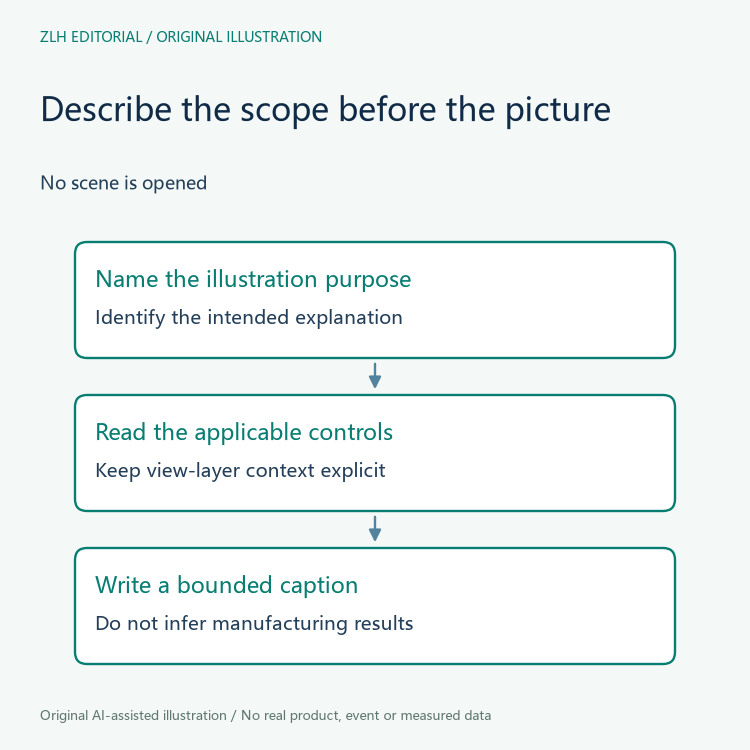
No render settings or collection properties are inspected here. If a later authorized exercise uses an actual scene, record the controls and view layer actually examined. A copied manual description is background guidance, not evidence that those settings were present.
Describe an unexpected picture without inventing a cause
Suppose an instructor later presents a prepared viewport and a final image that appear different. The learner should first identify which observation each statement concerns. Ask what visibility context is known before attributing the difference to a particular control or a missing object.
Several parts of an illustration workflow may need examination. This article does not diagnose a real mismatch or claim that visibility is its only possible cause. Its narrower contribution is to prevent the reader from treating the two viewing contexts as interchangeable evidence.
Preserve the original prepared material when asking for clarification. Editing a scene to match an expectation would change the subject of the reading exercise. A useful question can identify missing context without modifying the scene or manufacturing a successful output.
Carry the scope into the article caption
When an illustration is eventually used in a briefing, its caption should explain its role and any conceptual status. A polished render should not be presented as a product photograph or a record of an actual print. The author should keep illustration choices separate from manufacturing claims.
Ask a colleague whether the planned explanation distinguishes viewport context, render context, and the technical claim the image is meant to support. If the distinction disappears, narrow the caption or identify the additional evidence the claim needs.
More discussion appears in our additive-manufacturing briefing section and the article directory. Both original diagrams are conceptual reading aids, with no real scene, model geometry, output image, printed specimen, or measured manufacturing result.


